SubmitX modules by family
Sell
From the tender to the signed bid: measure, price, follow up.
- AI-assisted bids: The AI asks its questions, drafts a review you edit line by line, then you approve it. Nothing reaches the client without your approval. Included: Questions before numbers, Your prices first, source shown, You edit everything, It learns from your corrections, Three languages, Accept and sign, with proof.
- Measured and room-by-room bids: Bill by the square foot, linear metre or cubic yard. Every line keeps its dimensions, and the bid can be presented room by room. Included: Area, length, volume, Several sections, Roof slope, Internal waste factor, The measurement wins, Room-by-room bid.
- Plans, takeoff and AI analysis: Measure straight on the PDF plan, have the AI read a page and produce a bill of quantities ready to price. Included: Takeoff on PDF plans, The AI reads a page, SmartZone, Bill of quantities, Electrical analysis, Trade analyses and calculators.
- Satellite measurement and roofing: Trace a roof on the imagery, let the engine suggest the facets, then confirm. This is assisted measurement: you check it, it is not a land survey. Included: Polygons on imagery, Building detection, Roof facets, Slope confirmed by you, 3D view and assistant, Quebec orthophotos.
- Service catalogue: Your standard assemblies, with their lines, cost and markup, ready to drop into a bid. Included: Reusable services, Cost, markup, price, Cost from the Hub, A price source for the AI.
- SEAO and CanadaBuys tenders: SubmitX watches the open notices from Quebec and the federal government and shows you the ones that fit, with the reason. Included: Match explained, Your criteria, A bell alert, Price benchmark, Create a bid, Freshness stated.
- Clients, CRM and pipeline: Client records, a column pipeline and leads from your forms and ads, in the same tool as your bids. Included: Client records, Column pipeline, Leads from everywhere, Client portal, E-signature.
- Leads qualified by text: An AI agent texts your new leads (web form, Meta, Google), asks your qualifying questions and hands over to you when it is time to call. Included: By source and campaign, Your questions, your tone, Within your sending hours, A human takes over, Follow-ups and booking, STOP honoured.
Plan
Projects, schedules, documents and models, from the contract to the last day on site.
- Projects and job tracking: An accepted bid becomes a project: phases, tasks, budget, documents, photos and the job journal in one place. Included: Phases, tasks, milestones, Change orders, RFIs and daily reports, Suggested tasks, Punch lists and inspections, Budget and actual costs.
- Gantt and schedules: Phases, tasks and milestones on a timeline, with the critical path and subcontractor confirmations that update in real time. Included: Phases, tasks, milestones, Critical path, Week, month, quarter, Confirmation by link, Pause and recalculation, Print and export.
- Unified calendar: Deadlines, meetings and job-site events in one place: phases, milestones, RFIs, inspections, tasks, shifts and deliveries, with Google and Outlook. Included: Five views, Eleven sources, one calendar, Google, Outlook, iCal, Invitations and replies.
- Project documents: Plans, contracts, reports and photos grouped by job, with search and sharing. Included: Filed by project, Search and filters, Sharing by link, Site photos and videos.
- BIM and IFC 3D viewer: Open an IFC model in the browser, spot clashes between disciplines and annotate in 3D. The computation runs on your own device. Included: IFC in the browser, Clashes between disciplines, 3D annotations, BCF export, Link to the takeoff.
- Design Studio: Draw your 2D plans, build the model and link it to the bid and the budget. Included: 2D plans and rooms, Schedules, Elevations and sections, IFC and clashes, Links to the bid and the budget.
Build on site
The job site in your pocket: app, camera, reports, service calls, weather and travel.
- iOS and Android app: The job site in your pocket: time punches, photos, tasks, punch lists and inspections, with the same account and permissions as at the office. Included: Offline, GPS punch clock, Built-in camera, Tasks and work orders, Notifications, Same permissions.
- Camera, photo measurement and LiDAR: A camera built for the job site: every capture carries its label and stage, and a photo can become a measurement. Included: Labels and stages, Mark up, Photo measurement, Walkthrough video, LiDAR scan, Assign it to a project.
- Site AI: Photograph, film or dictate: the AI asks its questions and drafts a document or a bid that you read before approving. Included: Photos, videos, dictation, Questions first, 15 illustrated document types, Videos seen and heard, Translation, From the visit to the bid.
- Service calls, dispatch and preventive maintenance: From the breakdown to the invoice: each call has its priority and target time, the dispatch centre places it in a technician's week, and recurring maintenance creates itself. Included: Service calls, Dispatch centre, Recurring preventive maintenance, Work orders, Materials used, Invoiced the same day.
- Job-site weather: Each project shows the weather at its address, and the analysis says which days suit the planned type of work. Included: Forecast at the project address, Risk by type of work, Days to pick or avoid, PDF report.
- Trips and mileage: Track kilometres, fuel and transport costs, project by project. Included: One trip, one project, Estimated cost, Optimise a route, Periods and PDF.
Crew and payroll
Time punches, schedules, tasks and payroll based on the official CCQ grids.
- GPS punch clock and time tracking: Punch in at the job site, inside a zone, with the employee's consent. A shift's time feeds the timesheet, payroll and project cost. Included: Punch zones, Automatic punch, Consent (Law 25), Voice punch, Shifts and timesheets, On site right now.
- Schedules and timesheets: Plan the crew's week, apply a template week automatically and export the hours to Excel or CSV. Included: Weekly schedule, Schedule templates, Timesheets, Alerts, Excel and CSV exports, Leave.
- Crew, HR and CCQ payroll: Employee files and a payroll preview based on the official ACQ and CCQ grids. SubmitX calculates, your accountant or payroll provider files. Included: Employee files, Official CCQ grids, Sector and status, Payroll preview, Reports, Real cost per project.
- Employee tasks: Who does what, where it is stuck and what is late, in a list or a kanban, at the office or on site. Included: List, kanban, by project, Assign and track, Task templates, Notes into tasks.
Invoice and get paid
From the deposit to the final payment, with your taxes and your accounting.
- Invoicing and payments: From the deposit to the final invoice, with GST and QST, contractual holdback and online payment by card or Interac transfer. Included: Deposit, progress, final, Payment schedule, Client portal, Payment tracking, Margin, WIP and backlog, Note and reminders.
- Accounting: Your accountant keeps their tools: SubmitX syncs with QuickBooks Online, Sage Business Cloud and Xero, and exports to Acomba and Sage 50. Included: QuickBooks, Sage, Xero, Acomba and Sage 50 exports, Ledger and reconciliation, CPA agent, Quebec taxes, Expenses by project.
- Finance and cash flow: What is left to collect, since when, and what is expected over the next weeks, in a single view. Included: Receivables and aging, 30-day forecast, Reminders, Financial statements and taxes.
- Receipt and invoice OCR: Photograph a receipt or an invoice: the AI reads the supplier, date, amount and taxes, and you approve before anything is booked. Included: A photo is enough, Filed to the project, Approval before booking, Receipt history.
Buy and subcontract
Purchase orders, supplier prices and subcontractors in one place.
- Purchasing, stock and equipment: From the purchase order to receiving, with stock and the equipment fleet in the same tool. Included: Purchase orders, Receiving and stock, Material groups, Equipment fleet, Price requests, Purchasing insights.
- Supplier Hub: Your supplier prices in one place, fed by your own sources: a file, an official feed, manual entry or the browser extension at your click. Included: Four legitimate routes, Comparator in safe units, You decide, Favourite suppliers, Dated prices, Check the price.
- Subcontractors: A directory with each subcontractor's RBQ licence, trades and rating, then invitations and contracts managed in one place. Included: Directory and ratings, Invitations, Confirmation by link, Renewable access, T5018.
Understand
See where the company stands, and what your past documents reveal.
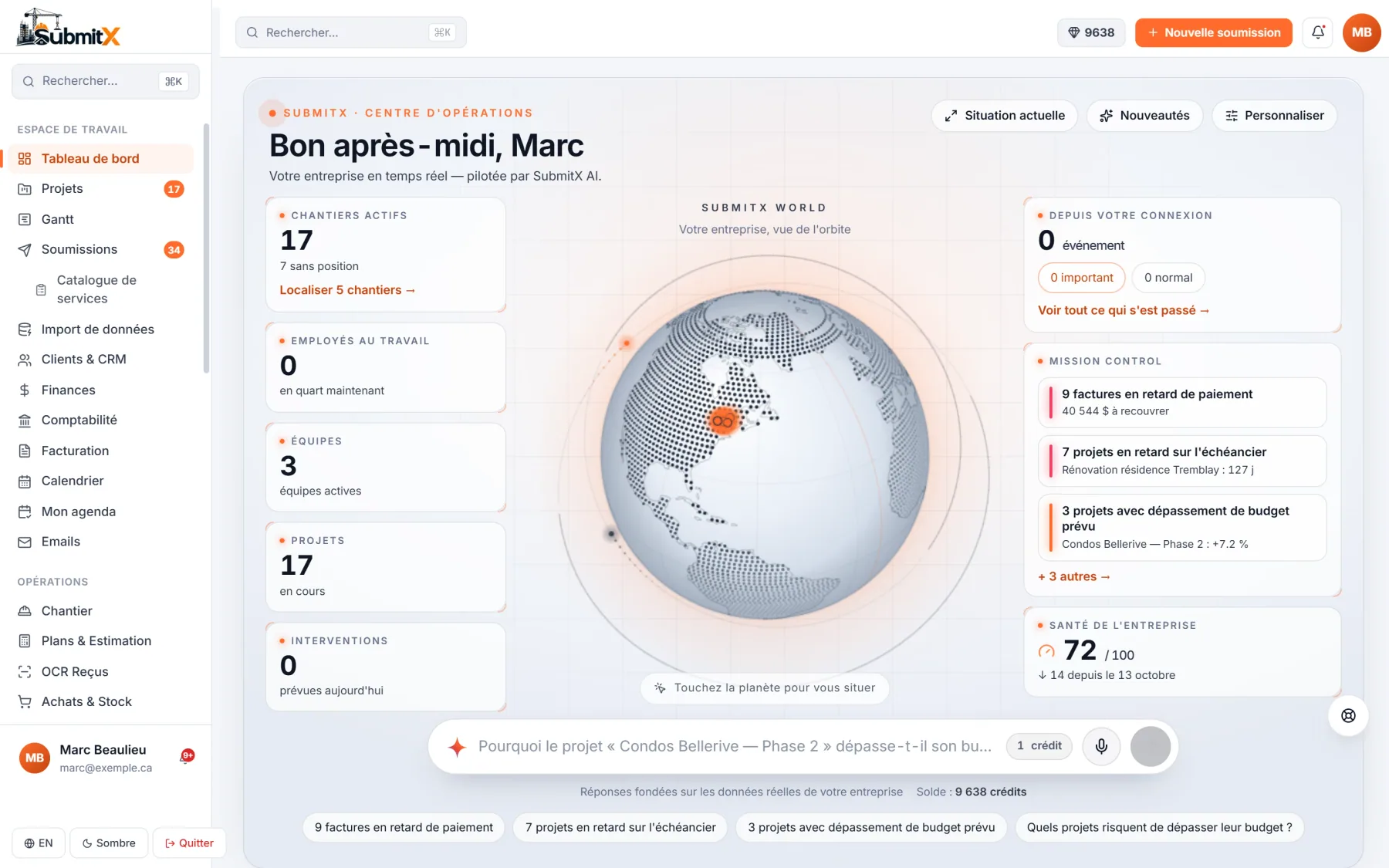
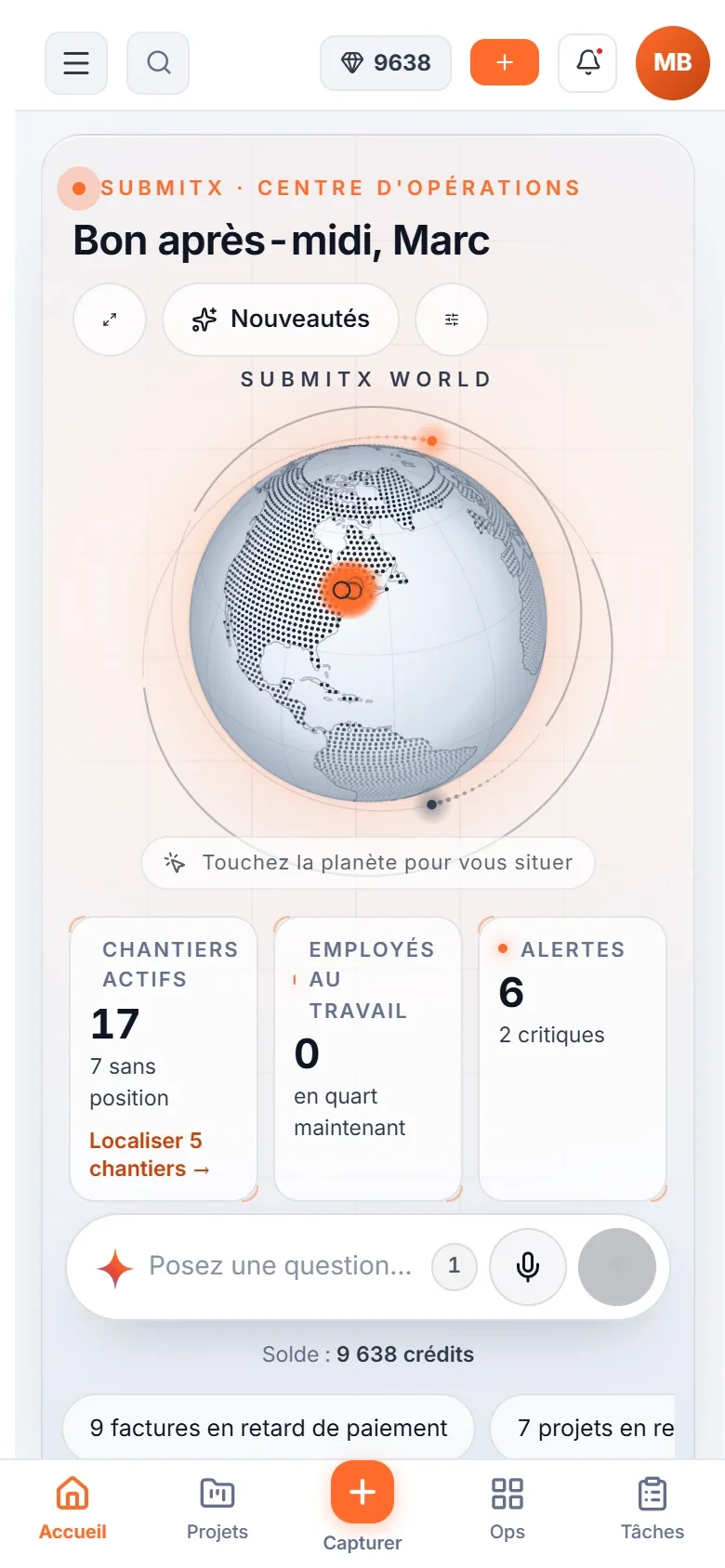
- Operations centre: Your company on a globe: alerts, company health, what changed since your last visit, and a bar to ask your questions. Included: Mission control, Company health, Since your last visit, SubmitX AI bar, Customizable, No tracking of people.
- Analytics: Sales performance and margins: invoiced revenue, gross margin, win rate and volume submitted, over the period you choose. Included: Revenue and margin, Revenue vs expenses, Funnel and top clients, AI summary and PDF export.
- SubmitX AI, Titan 3.5 engine: Titan 3.5 is SubmitX's construction AI: it starts from your data (prices, suppliers, catalogue, subcontractors, clients) before looking up current rates and prices, and only acts after you confirm. Included: Built for construction, Your data first, Titan 3.5 or Ultra, Confirmation before acting, Field mode for the crew, Bids and documents.
- Company memory: Drop in your past bids and invoices: the AI reads them and proposes your habits. Only the ones you accept are used afterwards. Included: Your past documents, Read by the AI, Proposed habits, Quoted, then billed, Administrators only, A credit-free option.
Connect
Your tools, Claude, your account's security and a network of professionals.
- Integrations: Your usual tools, connected to SubmitX: accounting, email, calendar, advertising and automation. Included: Accounting, Email and calendar, Advertising and leads, API, webhooks, Zapier, Make.
- Connected Claude (MCP): Run SubmitX from your own Claude account: more than 360 tools, with the same permissions as your users. Included: 360+ tools, Your Claude, your cost, Same permissions, Plans, measurements and photos, A key you control.
- Security and administration: Everyone sees what their role allows, everything is logged, and your data is hosted in Montréal. Included: Per-module permissions, Audit log, Montréal, Law 25, AES-256, Two-factor authentication, Team invitations, Shared AI credits.
- SubmitX Network: A free network of construction professionals, opening region by region. It is closed for now: you join the waiting list for your region. Included: Waiting list by region, "Verified" is computed, Your contact details stay private, Nothing is sold.
Updated October 21, 2026
Construction ERP software: what SubmitX brings into one system
Construction ERP software keeps a contractor's bids, projects, invoicing, accounting and payroll in one shared database. SubmitX is a construction ERP built in Quebec: an accepted bid becomes a project, then an invoice, without re-entering the data.
In practice, each piece of information is entered once and flows between modules:
- Bids, built manually or drafted by AI, with a product and service catalogue.
- Clients and CRM: client records, sales pipeline, opportunities and follow-ups.
- Projects: Gantt schedule, RFIs, change orders, daily reports and punch lists.
- Invoicing and payments: invoices, client portal, e-signature and online payment through Stripe.
- Accounting: GST/QST, sync with QuickBooks Online, Sage Business Cloud and Xero, Acomba and Sage 50 exports.
- Team and payroll: timecards, punch clock and CCQ payroll.
- Field: iOS and Android app for job-site crews.
- Public tenders: monitoring of SEAO, Quebec's public tendering system, and of CanadaBuys.
Available modules depend on the plan. The Free plan includes unlimited bids; project management, accounting and CCQ payroll are included in the Pro plan. See pricing for the details.
Construction management software: who SubmitX is for
SubmitX is construction management software for general and specialty contractors who want to replace several tools (spreadsheet, quoting tool, calendar, accounting software) with one platform. Self-serve plans cover one person up to 25 users; larger companies get the Ultra plan on quote.
It is built for residential renovation, roofing, electrical, plumbing, excavation and carpentry contractors, as well as general contractors. The industries page covers needs by trade.
What changes day to day
- The office and the job site see the same data: plans, tasks, photos and hours.
- Roles and per-module permissions limit what each employee sees (for example, a foreman without access to finances).
- The audit log keeps a record of important actions.
- Existing data imports from Excel or CSV (clients, products, bids).
Construction project management: schedule, RFIs, change orders and reports
SubmitX's construction project management module follows each job from the accepted bid to closeout: Gantt schedule, RFIs, change orders, daily reports and punch lists.
- Gantt chart: phases, tasks, milestones and dependencies. Moving a phase shifts the tasks that depend on it.
- RFIs: questions to architects and engineers, with answers and due dates tracked.
- Change orders: each contract change is priced, sent to the client and approved before it is billed.
- Daily reports: crew on site, work completed, weather, photos.
- Punch lists: items to fix with photos, owner and status.
- Project documents: plans, photos and files grouped by job and shareable.
Project management is included in the Pro plan (pricing on request).
Construction invoicing software: from bid to payment
SubmitX works as construction invoicing software: an accepted bid converts into an invoice, the client views it in their portal and can pay online by card through Stripe. GST (5%) and QST (9.975%) are calculated on every document.
AI-drafted bids, approved by you
The AI first asks 1 to 6 questions about your project, then drafts a review: lines, prices, and the source of each price. You edit everything, and nothing is created until you click "Approve". Taxes are recalculated after each change, and the bid never goes to the client without your approval.
Invoice and get paid
- Client portal: the client opens their bid or invoice from a secure link.
- E-signature of the bid by the client.
- Online payment through Stripe, with the invoice status updated.
- At most three automatic reminders to clients, at 2, 5 and 10 days, and receivables tracking.
Construction accounting software: GST/QST and your existing books
SubmitX does not force you to drop your accounting software: it syncs with QuickBooks Online, Sage Business Cloud and Xero, and produces exports for Acomba and Sage 50. Your accountant keeps their tools, and invoices, payments and expenses entered in SubmitX do not need to be retyped.
- QuickBooks Online: sync of clients, invoices and payments. Sage Business Cloud and Xero sync too.
- Acomba and Sage 50: exports of entries to import into those programs.
- Taxes: GST 5% and QST 9.975% in Quebec, calculated automatically on bids and invoices.
- Expenses and receipts: costs recorded per project to track real profitability.
- Exports: hours to Excel or CSV, accounting to Acomba (XML) and Sage 50 (CSV).
CCQ payroll and timecards
SubmitX prepares a payroll preview for CCQ-regulated employees, based on the official ACQ and CCQ grids in force on April 26, 2026, from timecards entered at the office or on site. Hours are tied to the project, which gives the real labour cost per job.
To check an hourly rate before entering it, use the CCQ wage rate calculator. Payroll for Quebec contractors is covered in more depth in payroll and HR software for Quebec contractors (French guide: paie CCQ).
Construction job-site app for iOS and Android
The SubmitX job-site app is available on iOS and Android. Employees punch in, check their tasks and plans, take photos and fill out daily reports directly on site.
- Time punches tied to the right project.
- Assigned tasks and punch lists with photos.
- Daily reports from the phone.
- Access to project documents and plans.
- Same account and same permissions as on the web.
SEAO public tender monitoring
SubmitX monitors the open notices on SEAO (the Government of Quebec's electronic tendering system) and CanadaBuys (federal), and flags the ones that match your criteria.
You pick your trades, regions and keywords, and each notice explains why it matches you. Quebec's files are published on Mondays, 1 to 14 days behind: it is not real time. See the SEAO page (in French).
Security, Canadian hosting and data ownership
SubmitX data is hosted in Montreal. Accounts are protected by two-factor authentication, per-employee and per-module permissions, and an audit log.
- Two-factor authentication (2FA).
- Per-employee, per-module permissions.
- Audit log of actions.
- Enterprise single sign-on (SAML SSO) on the Ultra plan.
- Hosting in Montreal, Law 25 compliance and AES-256 encryption.
- Your data stays yours: hours to Excel or CSV, accounting to Acomba and Sage 50.
Technical details are in the security FAQ (in French).
What to know before you choose
No software fits everyone. SubmitX's limits (modules reserved for the Pro plan, capped AI credits, Ultra only on quote) are laid out plainly on the SubmitX pros and cons page (in French). Prices and the annual cost of each plan are on the pricing page.
SubmitX plan summary
| Plan | Price | Users | AI credits / month |
|---|
| Free | Free (permanent) | 1 | 0 (buy as needed) |
| Starter | On request | Up to 3 | 100 |
| Pro | On request | Up to 25 | 300 |
| Ultra | On request | 25 and more | Unlimited |
Frequently asked questions about features
What is construction ERP software?
Construction ERP software brings a contractor's bids, projects, invoicing, accounting and payroll into one database. SubmitX is one, built for contractors in Quebec.
Do AI-generated bids go straight to the client?
No. The AI first asks its questions, then drafts a review that you edit. Nothing is created until you click "Approve", GST and QST are recalculated, and nothing is sent to the client without your approval.
Does SubmitX replace my accounting software?
Not necessarily. SubmitX syncs with QuickBooks Online and exports to Acomba and Sage 50, so your accountant keeps their usual tools.
Is there a mobile job-site app?
Yes. The SubmitX app is available on iOS and Android: punch clock, tasks, photos, daily reports and project documents.
Where is my data hosted, and can I get it back?
Data is hosted in Montreal. Hours export to Excel or CSV, and accounting exports to Acomba (XML) and Sage 50 (CSV).